
Intro to Relational Databases and SQL
Click here to access recording
Learning Objectives
| Students will be able to: |
|---|
| Describe the use case of databases |
| Describe the anatomy of a relational database |
| Describe the use case of SQL |
Use the psql Interactive Terminal |
| Use SQL to create a database and a table |
| Use SQL to perform CRUD data operations |
Database Intro
What is a Database?
The vast majority of applications manipulate and display data.
Early on, our programs held data in "memory" using data structures such as arrays and objects. However, when the app was exited, any changes to the data were lost - databases avoid this...
Simply put, a database provides permanent storage for data.
Different Types of Databases
This site ranks databases according to their popularity.
As you can see, there are several different types of databases and several "brands" within each type.
Most database technologies can be broken down into two main categories:
- Relational databases
- NoSQL databases
Relational databases are by far the most popular type of database technology. Conceived by E.F. Codd while working for IBM back in 1970.
The popularity of SQL databases has alot to do with the fact that they were created in the 1970s and are multi-purpose where as many NOSQL models are customized for specific use cases like Elastic and Redis for example.
In SEI, we'll be using PostgreSQL since it's arguably the best open-source relational database management system (RDBMS) available.
Anatomy of a Relational Database
Schema
The structure of a particular database is defined by a schema.
Schemas define the database's:
- Tables, including the number and data type of each column
- Indexes for efficient access of data
- Constraints (rules, such as whether a field can be null or not)
Tables
The primary container for data in a relational database is a table:

As you can see, database tables look a lot like a spreadsheet since they consist of columns and rows.
Tables are also known as relations, thus the term relational database.
A single table in a relational database holds data for a particular data entity, for example, customers, orders, reviews, etc.
TABLE: artists
| id (PK) | name | nationality |
|---|---|---|
| 1 | Prince | American |
| 2 | Sir Elton John | British |
TABLE: songs
| id (PK) | name | year_released | artist_id (FK) |
|---|---|---|---|
| 1 | Tiny Dancer | 1971 | 2 |
| 2 | Little Red Corvette | 1982 | 1 |
| 3 | Raspberry Beret | 1985 | 1 |
| 4 | Your Song | 1970 | 2 |
The naming convention for tables is typically snake-cased and always plural.
Rows (Records / Tuples)
A row in a table represents a single instance of the data entity.
For example a particular artist in the artists table.
Columns (Fields)
The columns of a table have a:
- Name
- Data type (all data in a column must be of the same type)
- Optional contraints
The typical naming convention is usually snake-cased and singular.
PostgreSQL has many data types for columns, but common ones include:
- integer
- decimal
- varchar (variable-length strings)
- text (unlimited length strings)
- date (does not include time)
- timestamp (both date and time)
- boolean
Common constraints for a column include:
PRIMARY KEY: column, or group of columns, uniquely identify a rowREFERENCES(Foreign Key): value in column must match the primary key in another tableNOT NULL: column must have a value, it cannot be empty (null)UNIQUE: data in this column must be unique among all rows in the table
Primary Keys (PK) and Foreign Keys (FK)
The field (or fields) that uniquely identify each row in table are know known as that table's primary key (PK).
Since only one type of data entity can be held in a single table, related data, for example, the songs for an artist, are stored in separate tables and "linked" via what is known as a foreign key (FK). Note that foreign key fields hold the value of its related parent's PK.
Database Review Questions
❓ A __ defines the structure of a particular database.
❓ A table in a database consists of __ & __.
❓ A __ key uniquely identifies a row within a table.
❓ A __ key references the primary key in a different table.
SQL
What is SQL?
SQL (Structured Query Language), typically pronounced "sequel", is a programming language used to CRUD data stored in a relational database.
SQL syntax is similar to the English language.
Although SQL is fairly standard, it can vary from depending on the particular RDBMS. For example, the SQLite RDBMS has a minimal implementation of SQL commands.
The psql Interactive Terminal
There are several GUI tools available for working with PostgreSQL, however, in SEI we won't need one because we'll mostly be accessing the database using Python/Django and it's better to learn SQL commands in terminal.
psql is a tool that runs in terminal and allows us to work with PostgreSQL databases by typing in commands. It was installed with PostgreSQL.
Open a terminal session and type: psql.
You'll see your PostgreSQL version and psql's prompt:
$ psql
psql (13.1)
Type "help" for help.

arthurbernier=#
Here are some useful commands (note the use of a backslash):
help -- general help
\?   -- help with psql commands
\h   -- help with SQL commands
\l   -- Lists all databases
\c   -- Connect to a database
\q   -- exits psql
q    -- exits a psql list or dialogue
Introduction
Why are we talking about SQL?
Most applications need a data store to persist important information. A relational database is the most common datastore for a web application. SQL is the language of relational databases.
At it's simplest, a relational database is a mechanism to store and retrieve data in a tabular form.
Spreadsheets are a good analogy. Individual sheets as tables and the whole spreadsheet as a database. See this link for an example.
Why is this important?
Database tables are a good place to store key/value pairs, as long as the values are simple types (e.g. string, number). The keys are the column names and the values are stored in each row. Column names and their corresponding data in each row maps well to simple JSON objects. A group of rows from one table maps well to a JSON array.
What about more complicated data?
Database tables can reference other tables which allows arbitrary nesting of groups of simple types. This is something we'll be looking at more closely later.
Relational Database Management System (RDBMS)
A Database Server is a set of processes and files that manage the databases that store the tables.
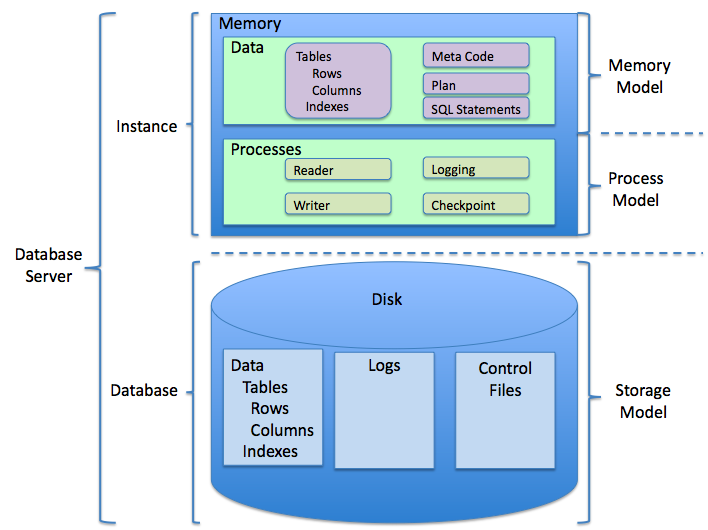
Sticking with our previous analogy a database server would map to Google Sheets.
Verb Equivalence
CRUD (create, read, update and delete), SQL, HTTP, and Rails Controller action.
| CRUD | SQL | HTTP | action |
|---|---|---|---|
| Create | INSERT | POST | create |
| Read | SELECT | GET | index/show |
| Update | UPDATE | PUT | update |
| Delete | DELETE | DELETE | destroy |
PostgreSQL
We'll be using PostgreSQL, a popular open source database server, which should already be installed on your computer.
When should I use SQL or NoSQL SQL vs NoSQL
From Medium
Which Database to Use
It depends! I know — bogus answer, right? What I’m getting at is that each database type has its own merits and pitfalls. We’ll discuss a few of them briefly, but before making a decision on what database to go with, you should already know what you’re building and what you want your data to look like, and then pick the solution that works best for your needs — just as you would with any other technology for your application. Now, this is by no means an exhaustive list of pros/cons — but are usually some of the main points that are hit when considering which type of database to use. That being said, I would encourage you to dive deeper into each database and even build some small applications using each one to see how they work!
Arguments for SQL (Relational Databases)
Structured Data Relational databases are really nice when you have a lot of data that’s needs to be structured in a very specific way, with different sets of data that relate to each other in some way. ACID compliance Most SQL databases are ACID compliant. Hit the link for the full details, but the short and sweet version is that this is a set of rules that guarantees the integrity of your data — even if the power going to your servers is inadvertently cut off! Joins This is in regards to data retrieval. When developing a complex application, often times you’ll need to retrieve multiple sets of data held in different tables. This is easily accomplished by ‘joining’ two or more tables together, and grabbing all of the information you need at once. Currently, there’s no way to do this in a Document based NoSQL database — meaning that if you need to retrieve multiple sets of data, you’ll have to make multiple queries to your database!
Arguments for NoSQL
Flexible If your data is not necessarily structured in a certain way, or if you have multiple sets of data that need to be structured in a way that a table could not easily support (ie: nested objects), NoSQL databases are a great option. They allow you the flexibility to structure your data in a way that makes the most sense for your application without needing to abide by the row/column format. Fast At the cost of ACID compliance, you gain significant speed! Not to say that SQL databases are slow, but by comparison NoSQL databases are much faster when you’re querying them. However, be careful when considering this point — as mentioned earlier, there’s no way to ‘join’ different sets of data, so if you find that your application needs this functionality, it may cost you the speed that you gain if you have to make lots of queries to your database to get the data you need. Ease of Use As you saw above, everything is represented as an object — making them very easy to reason about since we already know how objects work and are structured in programming. As a result, there’s very little learning curve in using these kinds of databases which is nice if you need to get up and running quickly.
## SQL's Big Gotcha

SQL statements require being ended with a `;`

Most of your postgres prompts will look like this

<img src="https://i.imgur.com/vnBsiJo.png" alt="sql" width="100"/>


If you forget  your semi-colon, the prompt will drop to the next line and change slightly

<img src="https://i.imgur.com/1dAwOJT.png" alt="sql" width="400"/>


You must add a semi-colon to end your statement

<img src="https://i.imgur.com/L9OBfRv.png" alt="sql" width="100"/>


## SQL Syntax

Even though keywords in SQL are not case sensitive, the convention is to capitalize them.

```sql
-- correct
SELECT * FROM actors;

-- incorrect
select * from actors;
Notice, comments can be new line or after a line and they start with two dashes --
Create a Database(Review)
Like MongoDB, Postgres has "sub-databases":
-- create the sub database foo
CREATE DATABASE foo;

-- drop it
DROP DATABASE foo;

-- get started with our code along
CREATE DATABASE my_test_db;

-- connect to the my_test_db sub database
\connect my_test_db;

-- OR (does the same thing as connect, just shorthand)
\c my_test_db;
Data types
Postgres as you recall has the following data types (most common):
int- whole numberdecimal- float/decimal numberbool- booleanvarchar(n)- text with a character limittext- text with no character limittimestamp- date
Extra
Hello, I'm Mr. Null. My Name Makes Me Invisible to Computers
Create a table
- Instead of collections, we have tables, which are just like a spreadsheet, or grid. Rows are entries, and columns are properties of each row.
- Unlike MongoDB, you have to tell Postgres to specify each column and what is the data type for each column. It's very 'strict'
-- describe your tables
CREATE TABLE foo ( name varchar(20) ); -- create a table called 'foo' with one column called 'name' which is a small text column

-- see table
\dt

-- drop a table
DROP TABLE foo;

-- 'actors' table has an id column, which is just a number that increases with each addition, and columns for first_name, last_name, height (in mm), and boolean properties for sing and dance

CREATE TABLE
  actors
  ( id serial, first_name varchar(20) NOT NULL, last_name varchar(20), height int, sings BOOLEAN, dances BOOLEAN DEFAULT false);

-- describe the columns of the test sub database
\d actors;
Insert into the table
You don't have to remember the order of the columns that you created, but you do have to match the order in the insert
INSERT INTO
  actors ( height, first_name, sings, last_name, dances )
VALUES
  ( 179 , 'Caity' , false, 'Lotz', true ); -- create a row
You also don't have to enter all the fields (only the ones required)
INSERT INTO actors (first_name) VALUES ('Sting');Let's copy paste a few more actors so we can play around with SQL some more
INSERT INTO actors (first_name, last_name, height, sings, dances) VALUES
('Melissa', 'Benoist', 173, true, false),
('Nicole', 'Maines', 170, true, true),
('Brandon', 'Routh', 189, false, false),
('Amy Louise', 'Pemberton', 160, null, null),
('Dominic', 'Purcell', null, null, null),
('Nick', 'Zano', 183, null, null),
('Maisie', 'Richardson-Sellers', null, null, null),
('Franz', 'Drameh', 180, null, null),
('Victor', 'Garbor', null, true, null),
('Tala', 'Ashe', 168, null, null),
('Arthur', 'Darvill', null, null, null),
('Jess', 'Macallan', 175, false, true),
('Matt', 'Ryan', 180, true, true),
('Adam', 'Tsekhman', null, null, null),
('Courtney', 'Ford', 165, null, null),
('Neil', 'McDonough', null, true, true),
('Ramona', 'Young', null, null, null),
('Melissa', 'McCarthy',157, true, true),
('Jenny', 'McCarthy',null, false, false);
Select from table
-- select all rows from the actors table.  display only the name column
SELECT first_name FROM actors;

 -- select all rows from the actors table.  display only the all columns
SELECT * FROM actors;

-- select all rows from the actors table where the name column is set to 'Tala'. You will need to use only single quotes.
SELECT * FROM actors WHERE first_name = 'Tala';

-- select all rows from the actors table where the name column is set to 'tala' or 'Tala' or 'TALA' (case insensitive.
SELECT * FROM actors WHERE first_name ILIKE 'Tala';

-- select all rows from the actors table where the name column contains 'Mel'. The % in this statment is a wildcard character used to represent a zero or more characters. [Wildcard Characters](https://www.w3schools.com/sql/sql_wildcards.asp)
SELECT * FROM actors WHERE first_name LIKE '%Mel%';

-- select all rows from the actors table where the name column is set to 'Melissa' AND the email column is set to McCarthy
SELECT * FROM actors WHERE first_name = 'Melissa' AND last_name = 'McCarthy';

-- select all rows from the actors table where either the first_name column is set to 'Ramonoa' OR the email column is set to last_name is equal to 'Ford'
SELECT * FROM actors WHERE first_name = 'Ramona' OR last_name = 'Ford';

-- select all rows from the actors table where the height column is set to 180
SELECT * FROM actors WHERE height = 180;

-- select all rows from the actors table where the height column is not set to 180
SELECT * FROM actors WHERE height != 180;

-- select all rows from the actors table where the height column is greater than 165
SELECT * FROM actors WHERE height > 165;

 -- select all rows from the actors table where the height column is less than 165
SELECT * FROM actors WHERE height < 165;

-- select all rows from the actors table where the height column is greater than or equal to 165
SELECT * FROM actors WHERE height <= 165;

-- select all rows from the actors table where the height column is less than or equal to 165
SELECT * FROM actors WHERE height >= 165;

-- select all rows from the actors table where the height column has no value
SELECT * FROM actors WHERE height IS NULL;

-- select all rows from the actors table where the height column has any value
SELECT * FROM actors WHERE height IS NOT NULL;
Update the table
-- update the actors table.  Set the height column to 181 for every row that has the id column set to 2
UPDATE actors SET height = 181 WHERE id = 2;
Delete from table
 -- delete all rows from the actors table that have the id column set to 19
DELETE FROM actors WHERE id = 19;
Additional Resources
Extra
- It is ACID-compliant and transactional
Essential Questions
Before moving on to the lab, let's answer a few questions...
❓ A database contains a _ for each data entity that an application has.
❓ True or False: In a relational database, all of the data in a given column must be of the same data type.
❓ A single instance of a data entity is represented by a __ in a table.
❓ The programming language used by relational databases is commonly referred to as __.
Further Study
If you'd like to go deeper into SQL, look into: