
Refactor to An API
Objectives
- Create an API Controller
- Integrate API Controller
- Use Postman to interact with api
- add CORS
Note ignore the url in the images they are only for example purposes
Follow the instructor and the text
Currently we have 3 Controllers
View Controller
const RESOURCE_PATH = '/fruits'
const viewController = {
  index(req, res, next){
    res.render('fruits/Index', res.locals.data)
  },
  show(req, res, next){
    res.render('fruits/Show', res.locals.data)
  },
  edit(req, res, next){
    res.render('fruits/Edit', res.locals.data)
  },
  newView(req, res, next){
    res.render('fruits/New')
  },
  redirectHome(req, res, next){
    res.redirect(RESOURCE_PATH)
  },
  redirectShow(req, res, next){
    res.redirect(RESOURCE_PATH + `/${req.params.id}`)
  }
}

module.exports = viewController
data Controller
const Fruit = require('../models/fruit.js');

const dataController = {
  index(req, res, next){
    Fruit.find({}, (error, allFruits) => {
      if(err){
        res.status(404).send({
          msg: err.message
        })
      }else {
        res.locals.data.fruits = allFruits
        next()
      }
    });
  },
  create(req, res, next){
    req.body.readyToEat = req.body.readyToEat === "on" ? true : false;
    // Use Model to create Fruit Document
    Fruit.create(req.body, (error, createdFruit) => {
        // Once created - respond to client
        if(err){
          res.status(404).send({
            msg: err.message
          })
        }else {
          res.locals.data.fruit = createdFruit
          next()
        }
    });
  },
  show(req, res, next){
    Fruit.findById(req.params.id, (err, foundFruit)=>{
      if(err){
        res.status(404).send({
          msg: err.message
        })
      } else {
        res.locals.data.fruit = foundFruit
        next()
      }
    })
  },
  update(req, res, next){
    req.body.readyToEat = req.body.readyToEat === "on" ? true : false;
    Fruit.findByIdAndUpdate(req.params.id, req.body, { new: true }, (err, updatedFruit) => {
      if(err){
        res.status(404).send({
          msg: err.message
        })
      } else {
        res.locals.data.fruit = updatedFruit
        next()
      }
    });
  },
  destroy(req, res, next){
    Fruit.findByIdAndRemove(req.params.id, (err, fruit) => {
      if(err){
        res.status(404).send({
          msg: err.message
        })
      } else {
        res.locals.data.fruit = fruit
        next()
      }
    });
  }
}

module.exports = dataController
Route Controller
const express = require('express');
const router = express.Router();
const viewController = require('./viewController.js')
const dataController = require('./dataController.js')
// add routes
// Index
router.get('/', dataController.index, viewController.index);
// New
router.get('/new', viewController.newView );
// Delete
router.delete('/:id', dataController.destroy, viewController.redirectHome);
// Update
router.put('/:id', dataController.update, viewController.redirectShow);
// Create
router.post('/', dataController.create, viewController.redirectHome);
// Edit
router.get('/:id/edit', dataController.show, viewController.edit);
// Show
router.get('/:id', dataController.show, viewController.show);
// export router
module.exports = router;
No we want to create an API that other applications can consume
Lets create an API Controller that will return data as as json to the client
Step 1
- We need to add an additional piece of middleware to the server.js
// right below urlencoded
app.use(express.json())
Step 2
- Lets create a file
controllers/apiController.js
const apiController = {
  index(req, res, next){
    res.json(res.locals.data.fruits)
  },
  show(req, res, next){
    res.json(res.locals.data.fruit)
  }
}

// We only need Index and Show because we are currently only ever showing a list of fruits
// Or we are showing a single fruit
// Additional Routes will be added on Tuesday once we incorporate nuanced functionality
module.exports = apiController
Step 3
- Add Api Only routes to routeController
const express = require('express');
const router = express.Router();
const viewController = require('./viewController.js')
const dataController = require('./dataController.js')
const apiController = require('./apiController.js')
// add routes
// Index
router.get('/api', dataController.index, apiController.index)
// Delete
router.delete('/api/:id', dataController.destroy, apiController.show)
// Update
router.put('/api/:id', dataController.update, apiController.show)
// Create
router.post('/api', dataController.create, apiController.show)
// Show
router.get('/api/:id', dataController.show, apiController.show)

// Index
router.get('/', dataController.index, viewController.index)
// New
router.get('/new', viewController.newView )
// Delete
router.delete('/:id', dataController.destroy, viewController.redirectHome)
// Update
router.put('/:id', dataController.update, viewController.redirectShow)
// Create
router.post('/', dataController.create, viewController.redirectHome)
// Edit
router.get('/:id/edit', dataController.show, viewController.edit)
// Show
router.get('/:id', dataController.show, viewController.show)
// export router
module.exports = router;
Using Postman
HTTP defines five main methods, each of which corresponds to one of the CRUD functionalities.
| Method | Crud functionality | DB Action |
|---|---|---|
| GET | read | retrieve data |
| POST | create | add data |
| PUT | update | modify existing data |
| PATCH | update | modify existing data |
| DELETE | delete | delete existing data |
What's the difference at a technical level between a GET and a POST request?
There is of course the difference in the METHOD type, but also in the request payload. A POST request for instance will contain all of the data necessary for creating some new object.
GET is for when you want to read something. The parameters of the GET request are used for identifying which piece of data the client would like to read. The parameters of the POST request are used for defining a new piece of data.
RESTful Routes
A route is a method plus a path...
Method + Path = Route
Each route results in an action.
REST can be translated in to RESTful Routes (routes that follow REST):
| Action | Method | Path | Action |
|---|---|---|---|
| index | GET | /engineers |
Read information about all engineers |
| create | POST | /engineers |
Create a new engineer |
| show | GET | /engineers/1 |
Read information about the engineer whose ID is 1 |
| update | PUT | /engineers/1 |
Update the existing engineer whose ID is 1 with all new content |
| update | PATCH | /engineers/1 |
Update the existing engineer whose ID is 1 with partially new content more on this later |
| destroy | DELETE | /engineers/1 |
Delete the existing engineer whose ID is 1 |
Postman
Download Postman here if you don't have it already. You'll need to create an account (free!) to use it.
Postman is going to substitute for a front end for our testing purposes.
GET requests with Postman
Launch Postman. Make sure you're logged in (create an account if you don't have one).
Ensure nodemon is running with no errors.
- Enter
localhost:3000/fruits/apiin the address bar - Ensure the dropdown says
GET - Click
Send
You should see the response below, containing all the fruits!
Also test the show route. You should see a single fruit as the response.
Now let's test these routes in the browser!
Make sure nodemon is running and you don't have any errors, and open the same
two urls.
If we're just testing GET routes, we can use either Postman or the browser. But for anything more, we need to use postman, because its easier to send data.
Sending Data with Postman
- Launch Postman.
- Enter
localhost:3000/fruits/apiinto the bar at the top of the screen. -
Click on headers and add the following
- Select
POSTas the request type -
Under headers tab, specify the
Content-Typeasapplication/json. This allows the client tells the server what type of data is actually sent.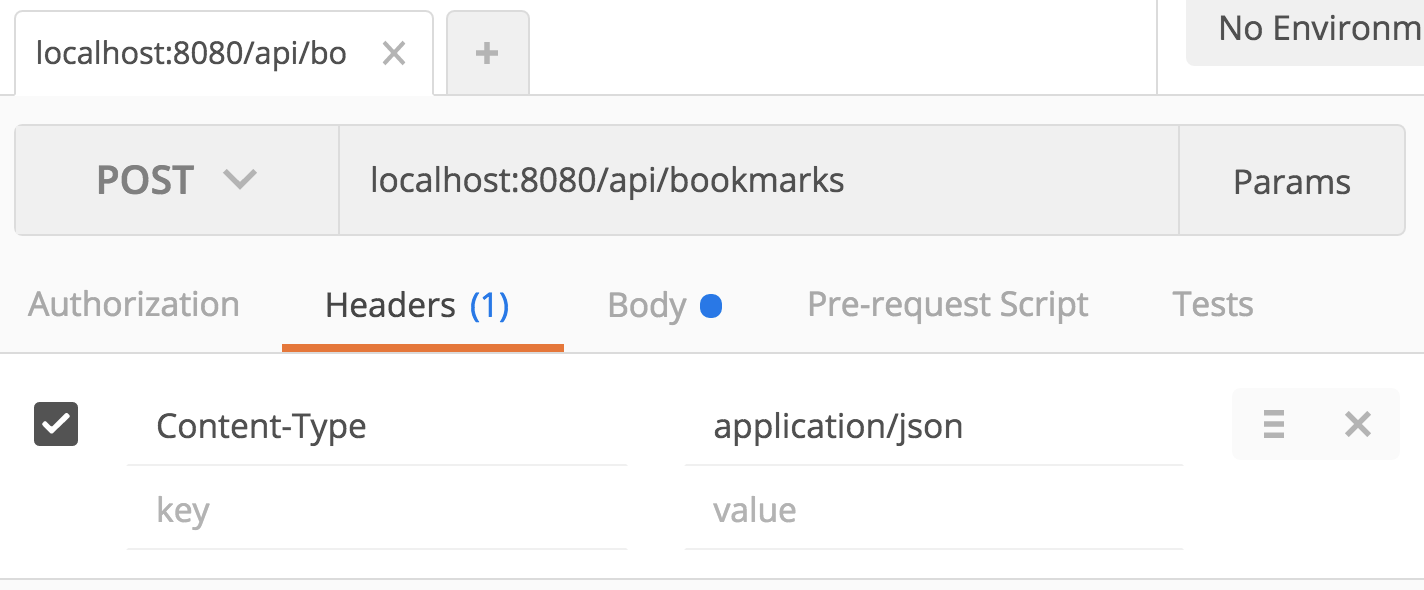
- Select
-
Then, click on the body tab, select the
rawradio button, and enter the new fruit we'd like to create in the database.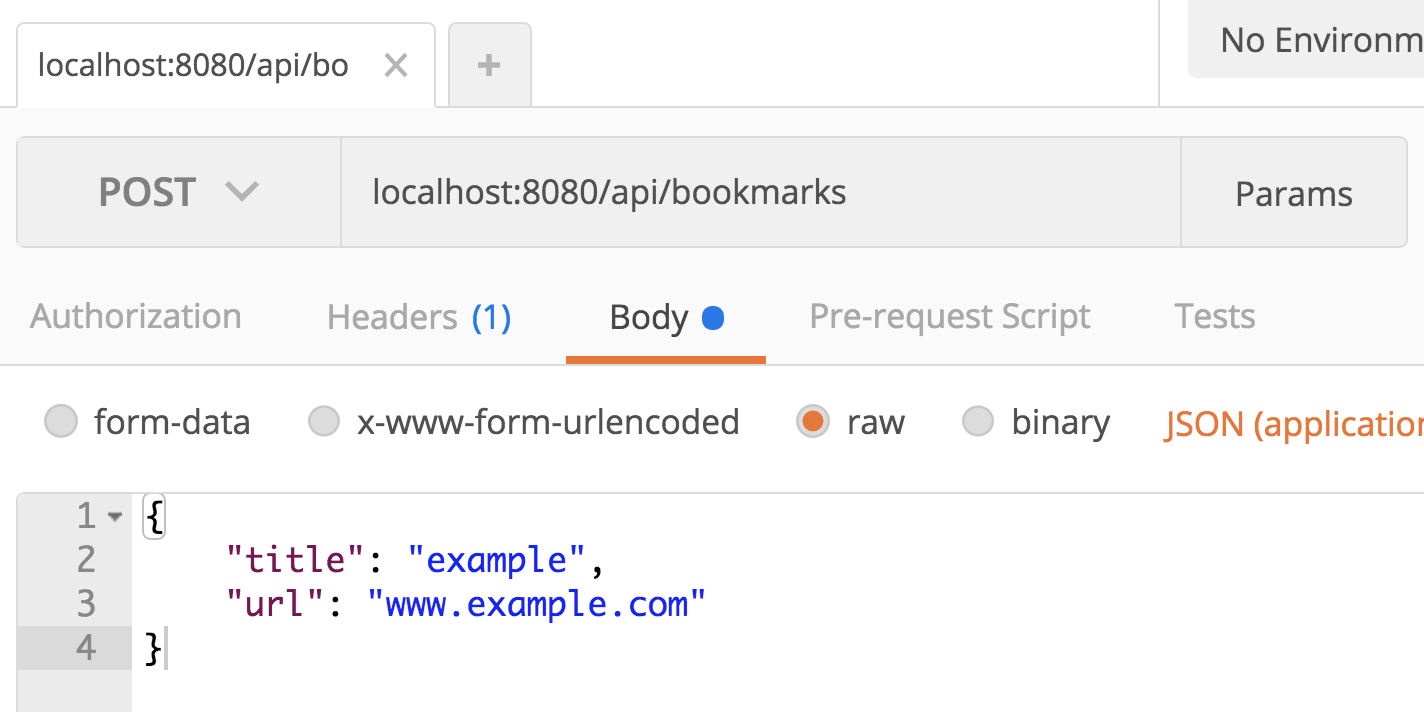
- Hit send! Scroll down and you'll the response in the panel below.
Note: These headers are always required when dealing with JSON. Depending on the client that we use (fetch, axios, etc), they can detect the type of data we're working with and set the headers for us automatically. Postman makes us do it manually.
What is the response that we get back?
Check your console (wherever nodemon is running) and you'll may see some output if you have an error. Postman will also show the response from the server.
Now try update and delete
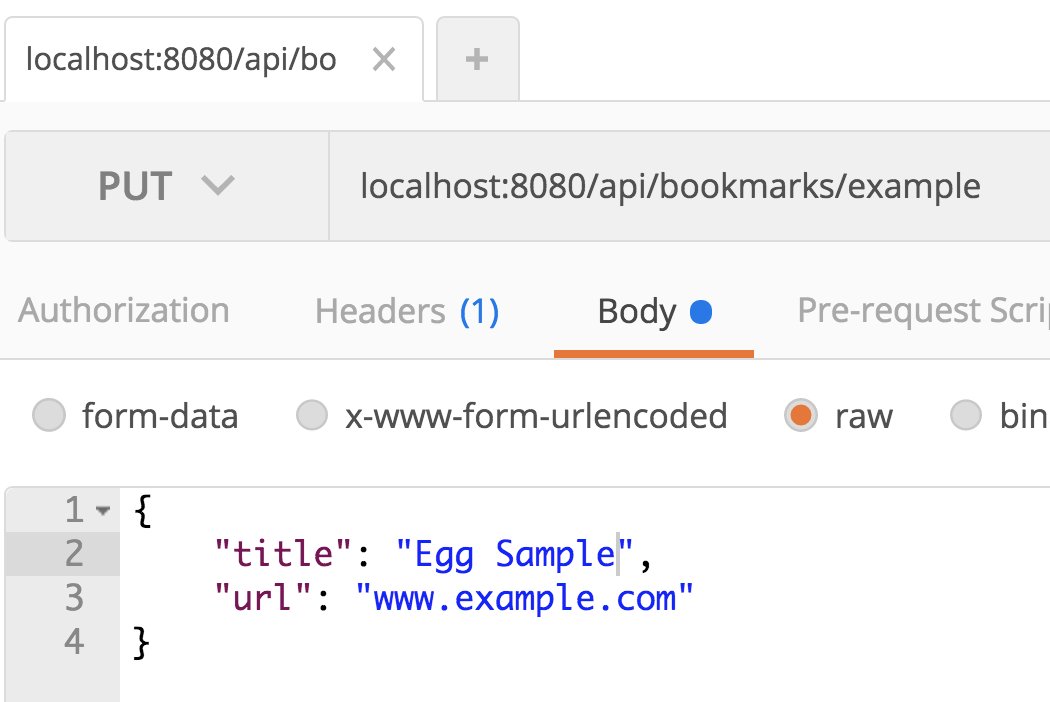

Add CORS
- In terminal add
npm i cors - Require cors in
server.jsconst cors = require('cors') - Add cors middleware
app.use(cors())after express.json middleware