
CRUD, MVC, REST, INDUCES and JSX: Remember where we are going


Lesson Objectives
- Add A Layout and use props & Children
- Add Static Files
- See Different ways that we can style components
What is a Layout
Sometimes you will have design elements that you want to repeat from page to page, It can get very repetitive to repeat these items from page to page.
You may have the same header, the same footer, the same sidebar etc every page you navigate to.
React lets us use Components in our JSX the same way you use traditional html elements, but we get to determine the design and functionality of the Components.
A different way of Seperating Concerns ( Component Driven Development )
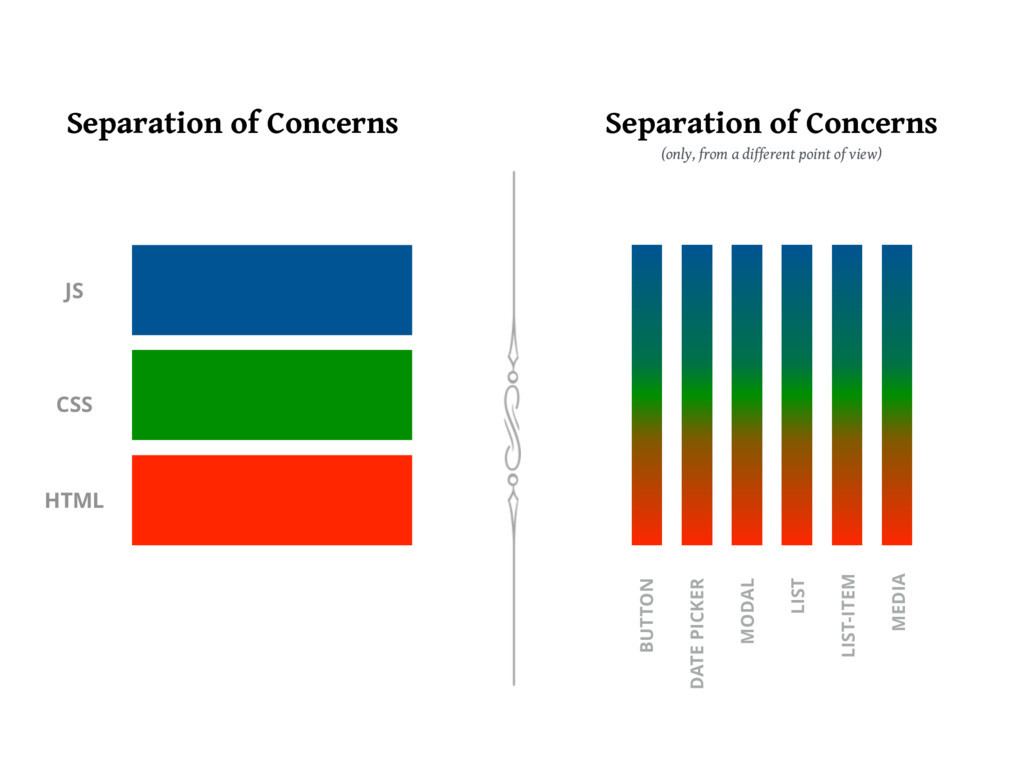
What will we do?
- We will make a Layout Component that has our default header and footer code
- We will set up this Layout Component in such a way that it can be imported into our New, Show, Index and Edit Views
- We will make it a Higher Order Component which means it can accept other components as children simmilar to how divs work in HTML
<div>
  Children of the div go here
</div>
Our JSX will look like this
<Layout>
  Children of the Layout go here
</Layout>
We will also use PROPS
Props
Props allows a component to receive data from its parent component.
Some rules
- Props can only be sent from a parent to a child
- If the parent needs data from the child it should send a function as a prop then the child can pass its data to the function as an argument.
- Anything can be sent as a prop, include JSX
- Express React Views as you know takes the
optionsobject fromres.renderand merges that data with the components PROPS
Our JSX will look like this
<Layout someProp="information">
  Children of the Layout go here
</Layout>
Examples
<Layout css="/css/styles.css">
  Children of the Layout go here
</Layout>
or
<Layout title="Index Page">
  Children of the Layout go here
</Layout>
or
<Layout fruit={this.props.fruit}>
  Children of the Layout go here
</Layout>
These two examples are an example of how one of the Views might pass data down to Layout Component
In the example that we will create below we will discuss how to use the props
Add a Layout
Use the code from last class and lets continue to update fruits
From your terminal
cd viewsThen
mkdir layout && touch layout/Default.jsxThen
code layout/Default.jsxOpen Up your Default.jsx and type up the following code
Simply pass the relevant props to a layout component.
views/layouts/Default.jsx:
const React = require('react');

class DefaultLayout extends React.Component {
  render() {
    return (
      <html>
        <head><title>{this.props.title}</title></head>
        <body>
        <h1>{this.props.title}</h1>
        {this.props.children}
        </body>
      </html>
    );
  }
}

module.exports = DefaultLayout;
Static Files
Create a static files folder for CSS/JS
- CSS/JS code doesn't change with server-side data
-
We can toss any static files into a 'public' directory
- static means unchanging
- dynamic means changing depending on data
Let's set up a directory for our static code:
- Create a directory called
public - Inside the
publicdirectory create a directory calledcss - Inside the
cssdirectory, create anapp.cssfile - Put some CSS in the
app.cssfile - Inside server.js place the following near the top:
CSS
@import url('https://fonts.googleapis.com/css?family=Comfortaa|Righteous');

body {
  background: url(https://images.clipartlogo.com/files/istock/previews/8741/87414357-apple-seamless-pastel-colors-pattern-fruits-texture-background.jpg);
  margin: 0;
  font-family: 'Comfortaa', cursive;
}

h1 {
  font-family: 'Righteous', cursive;
  background: antiquewhite;
  margin:0;
  margin-bottom: .5em;
  padding: 1em;
  text-align: center;
}

a {
  color: orange;
  text-decoration: none;
  text-shadow: 1px 1px 1px black;
  font-size: 1.5em;
  background: rgba(193, 235, 187, .9);
}

a:hover {
  color: ghostwhite;
}

li {
  list-style: none;
}

li a {
  color: mediumseagreen;
}

input[type=text] {
  padding: .3em;
}

input[type=submit] {
  padding: .3em;
  color: orange;
  background: mediumseagreen;
  font-size: 1em;
  border-radius: 10%;
}
Add to server.js
app.use(express.static('public')); //tells express to try to match requests with files in the directory called 'public'- In your views/layout/Default.jsx, you can now call that css file in a link tag in the head like this and that css will be applied to every page that uses the DefaultLayout
<link rel="stylesheet" href="/css/app.css"> Styling Components
- Use a style object
const redDivStyle = {
  backgroundColor: 'red'
}

class Page extends React.Component {
  render(){
    return (
      <div style={redDivStyle}>Red Div</div>
    )
  }
}- Adding CSS from a static file like above and using classes
<div className='classNameHere'>You Have To say className instead of class </div>- More Advanced, use a framework or a preprocessor like Bootstrap, SASS, LESS, JSS, TailwindCSS or Styled Components.
- The ones we will teach you in this class are SASS & Bootstrap.
JSX Syntax Quirks
- className instead of class
- props (always come from Outside the component)
- {} to embed Javascript
- {{}} for objects in JSX
one curly brace set to say I am writing JSand thenone curly brace for the object syntax - Writing CSS in CamelCase
- Conditional rendering
- Everything Must Close
- Looping with map or map & filter
- Anything can be dynamic